DCC
Everything on model trains, model railroads, model railways, locomotives, model train layouts, scenery, wiring, DCC and more. Enjoy the world's best hobby... model railroading!

Club member Ashley sent in this tip to share:
If you spot your train slowing down or stopping only in some places the problem may be caused by voltage drop. It could be that the distance to the nearest power source is too far or that perhaps the quality of the joints between track sections has weakened the flow of power.
Begin by tightening any loose joiners and if required, add a second set of wires from your power supply to the track in the problem area. Take care to connect each wire to the correct rail.
On larger layouts, especially with DCC setups, it is suggested a bus wire (with feeders) to multiple track sections be used. Keep in min d that using a heavier wire is more reliable than using the rails themselves. You can attach smaller feeder wires between the rail and the bus as often as required. Generally, feeder wires are attached every 6 to 12 feet or so.
Another option is to solder the rail joiners themselves. Doing this should minimize any voltage drop, as well as help get rid of any kinks that could potentially cause a derailment. Also consider leaving some joiners open to compensate for contraction or expansion over time.
Reg asks readers:
“In reading all the info on DCC I keep reading of the necessity to keep the motor isolated from the chassis. They go into quite a bit of detail about cementing the motor in being one way of insulating it from the chassis, or using black plastic electrician tape or other methods. I’m questioning this.
Surely if your motor windings are isolated from the chassis it won’t short out the decoder no matter if the chassis and motor casing is connected to one side of the track. Surely all you need is to ensure the motor windings are isolated?
The windings connect to one side of the decoder and the other side is connected to each side of the track no matter how its picked up. What does it matter if the motor case, and the entire chassis of the locomotive connected to one set of wheels acting as pickup for one side and is electrically isolated from the set of wheels connected to the copper pickup(s), you still have 2 separate pickups. Neither is connected directly to the motor winding. “
Johan sent in this question for readers:
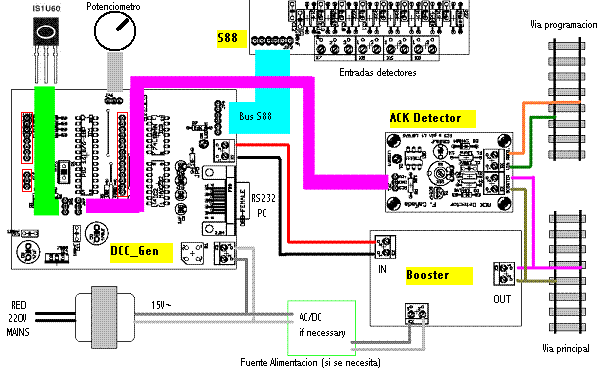
“Thanks for your model train newsletters. I love to read them. One big question, I have my own DIY dcc command station (DCC _Gen v 2c ) with ACK Detector, Booster R-CDE and a Feedback module S88. What kind of DCC hand held controller do I need. I bought my first model train in 1974 the Lima type.”
Bruce models HO and asks readers:
“I’m building a new layout in my garage 24×20. Should I run my bus wire from point A to halfway around one direction, and the other way to half way around, but not joined together at the halfway point? Or should I just make a single loop from point A to point A. Regular street talk will be best for me so I don’t get confused by all the tech talk thanks. Thanks.”
Drew needs advice from readers and asks:
“I have a rather large HO layout – arranged in a L shape – 20 ft x 8 ft – which I am converting to DCC. Since DCC is supposedly AC power (or so I have been told), why are boosters needed since AC keeps a constant current regardless of the distance to the power supply (well, within reason…)? I have also purchased two (2) boosters for my layout. Since I now have three power supplies does it matter where I place the boosters on the “L”? Thanks VERY much for the answers!”
Add your comment or suggestion below this posting if you can help Drew.
Club member Arnold has been railroading for over 35 years and sent in this article to share:
Contrary to what some people think, wiring for DCC wiring can actually be easier than the older style DC wiring.
Let’s look at some DC scenarios. An older DC layout might have a very basic loop with 2 wires attached at one location, whereas a more complex DC layout might need insulated rails and more power wires leading off to extra sidings (and sections) where you would probably need to turn off one train on one track to run another. If you wanted a couple of trains to operate on the same track you would more than likely separate the run into multiple sections. In that way you could turn off one train to prevent it from getting in close proximity to the train a head of it. Naturally each train would need to be within it’s own section to achieve this. So, unless you have a setup with a double pole switch to an individual section – the trains would all run in the same direction. So, as you can see there are limitations with DC operations.
Compare that to DCC where it’s easy to run bus wires under the baseboard, and then link to the rails using feeder wires. By doing that the power is on and can be left on all the time covering the entire layout. In effect, instead of having multiple wiring feeding out from your switchboard, you only need two main feeder wires.
So despite what you might have heard; wiring for DCC is simpler than for DC. I personally think it is well worthwhile converting over, and it opens up new operational possibilities. However if you are still operating DC, then just switch everything on (in the proper direction), and instead of the old transformer, link up DCC and you’ll have a DCC layout. That said; if your track has long runs you’ll need wire leads following the track beneath and link up extra wire drops along the way (with strong enough wire).
Model railroading has come a long way from clockwork wind-up toys to sophisticated digital technology. It’s now possible, and relatively inexpensive, to have model trains, accessories, and scenic features perform all kinds of interesting and useful functions.
Club member Ian asks readers:
“I have 14 older HO pre DCC engines and want to convert them over. Simple question is – can I install decoders in these old style locos? What kind of problems should I expect, if any? Also, I would appreciate any further guidance so I don’t stuff things up. Thanks in advance to all who reply.”
Dennis asks readers:
“Can I use HO NCE EB1 CB’s with the Digitrax DCS100 & 150? Will they trip before the DCS100/150’s? Can I program them with the Digitrax DT402 throttle? Are there any specific programming settings when using the EB1? I have 20 districts and 5amp supply.”
Tim asks readers:
“I have two HO DCC locomotives that I want to consist together so that can pull/push up a 4% grade on my layout. Both locomotives travel in different directions for forward & reverse. Can I change this in one of them using DCC or do I need to hard wire the change in the loco”
Miles asks readers:
“How do you install a Tsunami DCC decoder on a Rivarossi AC-11 HO scale cab forward locomotive? I plan to transform my entire layout to DCC, and I would like to start with this loco.”
Art has a question for readers:
“I guess I’m a dullard. Even with a strong technical background I haven’t figured out what I need to buy to get sound working in a NOS Aristocraft U25B Santa Fe locomotive. I’ve visited various websites – I know about different sound cards but beyond that not much. The last time I messed with model trains was when I kid and that was ages ago. I’m a newbie to G scale. What was a starter set that was just for year-end holiday decor has become a mainline RR.I have a couple of locos, several cars, track and a couple of analog power supplies. I don’t really know what’s needed to control the loco’s sound card or the costs involved. HELP!”
Salie has a DCC question for readers:
“If I join a club that’s running on DCC and I got a diesel locomotive that has a chip on board, is there a program through which I can use my tablet to control my train at the club?”
Max asks readers:
“My existing HO set-up is DC. Can this be converted to DCC without great expense? It is a three track oval, where one keeps passenger trains to the normal main line and runs freight around the inner goods loop. Three trains can be run at once.”
Phil sent in these questions for readers:
Dan also sent in this comment which I guess leads to a question:
“I am very interested in converting from DC to DCC. I hesitate only because of potential wiring issues and/or not being able to run my DC equipment.”
Article kindly submitted by Model Train Club Member Roger W.
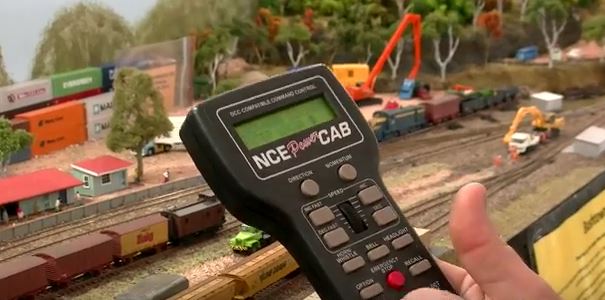 Despite DCC being around since as early as the late 1980’s, many model railroaders are still happy operating the older analog DC systems. From my limited 14 year experience in the hobby there still seems to be some confusion with how DCC works, especially among some of the veterans, and those ‘newbies’ who we desperately need to attract and encourage into model railroading.
Although the purists in the hobby might not approve of my following explanation of how DCC works, I’ve written it in very simple terms for everyone to understand. After all, for this hobby to continue successfully into the 21st Century, we need to encourage youngsters and ‘newbies’ into the hobby, without frightening them off with unnecessarily complicated terminology. When they get comfortable with the basics, they’ll hopefully progress to understanding the more intricate stuff. So here I go with my explanation of …
How DCC works
Basically every locomotive operating on the DCC controlled rails will have a small decoder fitted inside. The data commands will be transmitted to all locomotives at the same time. However each loco will have its own unique digital address, and when the digital signal is transmitted along the rails to a specific locomotive, only that loco will respond. The other locomotives on the layout will ignore any commands for the other loco, and continue operating in accordance with the last instructions that were sent specifically to them. So, if a loco had previously been told to “STOP”, or if the loco has not been given any instructions since turning on the DCC system, the loco will remain stopped.
It is a bit like when you have children – you assign each child a name, and they will (hopefully) respond when their name is called. However, unlike a child, a decoder will always do as it’s told.
So, a decoder will do “precisely as instructed”, immediately it receives specific commands… and, it will ignore commands sent along the same rails that are intended for other decoders.
DCC is not just for loco operation
DCC can be used for operating various devices and accessories (signals, sounds, lights, points, motors, etc), as well as for locomotive operation. Data will be sent to a specific decoder instructing it to act upon a command – be it turning on a light, starting an engine, or activating a whistle. Once the command has been given, the device will remain on that setting until it receives another unique command.
I gave the analogy earlier of decoders being compared to children; however instead of being given separate names, decoders are given separate address numbers to identify them. The advantage is that the operator can send different commands to each loco by calling up the address number of each loco, just like a parent would call out to each child by name.
Operating separate locomotives and accessories at the same time
Hence the great benefit of DCC – several locomotives can be operated on the same track, at the same time, just by calling up an address number and issuing specific digital commands. One loco might be told to move off, while another loco will remain stationary until it is instructed to do otherwise.
In practical term; a train can be set to operate on the main line, and then another locomotive (with a different decoder address) can be sent a signal instructing it to begin a shunting task on a siding. The train on the main line will continue operating uninterrupted whilst the other loco completes its tasks.
In another example; a loco could be stopped at a station platform and a second loco could be moved into position behind it (and even coupled to it) without the first loco moving, or needing an isolating track section. The two locomotives can even be coupled together to pull a heavy load by using a temporary address number. Both loco motors would be set to be controlled by that one temporary address number.
Depending on the system, there is generally an ‘ALL STOP’ button on the console or controller in case of an emergency. Activating this will stop everything, to allow for the problem to be fixed. Usually each loco is started again in turn.
In summary; several locomotives can operate at the same time thanks to DCC. The system can also be used to control train lighting, points, signals, and even ‘on-board’ effects like whistles, horns and chugging sounds. DCC provides more flexibility and control so increases the variety of possible functions on a model railroad.
Thanks Roger for taking the time to write this article and for allowing me to share it with the 10,000 weekly readers to this blog. Your contribution to the hobby is appreciated.
If you have a unique article you would like to share with others on this blog, you can submit it to the Blog Moderator here http://www.model-train-layouts.net/Submit-An-Article.html
John is new to model railroading and would like some help from ‘those in the know’ and asks:
“I have been interested in a model train layout for some time. Being green on the subject, what is DCC & Tsunami DCC and how involved is it for a newbie interested in getting started with a HO layout?”
Doc has HO scale and asks readers:
“I just installed a JMRI system with my NCE DCC and iPhones. During operation, I lose my wireless connection. My Dell computer does not lose the wireless connect. My DCC sound still works but I have not control of the engine functions until I shut down and reboot. Any help out there.”