DCC
Everything on model trains, model railroads, model railways, locomotives, model train layouts, scenery, wiring, DCC and more. Enjoy the world's best hobby... model railroading!

Palitha asks:
Can someone kindly recommend DCC decoders and speakers for the following DC engines
1, DENVER & RIO GRANDE GP40 Diesel Locomotive Atlas #7038 HO
2,H0 Fleischmann 1156 Dampflok Baureihe 56 DB, AC, OVP
David K Thompson author of the DCC Help e-book contributed this article to share:
Is DCC what I am looking for?
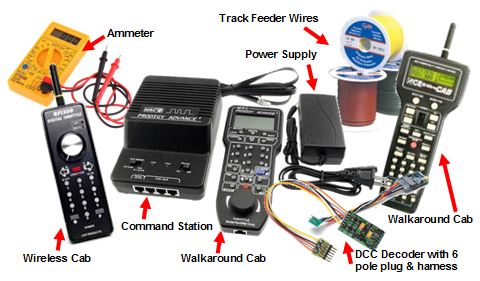
The DCC layout has several advantages over the conventional DC railroad model, but the end decision on whether or not you should get it for your project depends upon your considerations and requirements.
At the end of the day, it is all about ease of use, functionality, and worth based on the money. So, make sure you keep the following points in mind before deciding upon DCC as your final choice for your personal railroad model!
Clint has HO and asks:
“I have a DCC layout. I purchased a used, but newer, (closed can motor) Walthers Trainline diesel. The track has been cleaned. All other locomotives run fine, but the Walthers hesitates and sometimes stalls. Are the wheels different on the Walthers? What is the fix?”
Kim writes:
“I am working with Peco Electro Frog turnouts and I am using the Circuitron SMAIL switch machines but the electrical puzzle I am dealing with now has nothing to do with the motors. So this person from Iron Planet Hobbies says do not modify these so the jumpers underside are connected, There were connected out of the package and there is a frog wire. So in my photos I am showing first a single left turnout, currently directing the train to the curve so in that position switch is working fine. The other way I have set up as a switch throw and it goes into a spur by an elevator so what is happening, when I throw the switch and the blades move to other rails, it is causing a track fault.
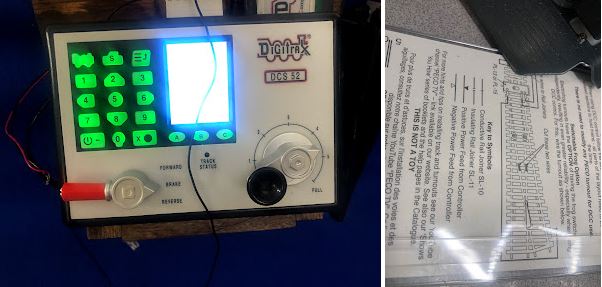
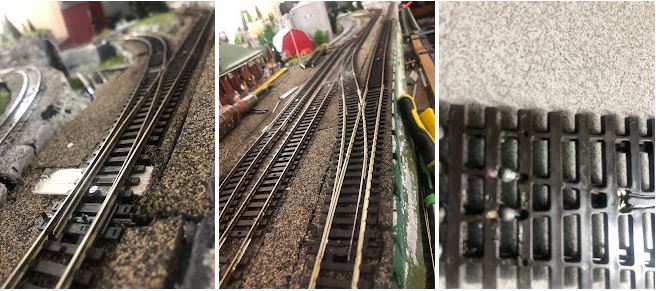
So other photo is a crossover using two left turnouts. It is fine when they are in close (straight) but like the other one (#3), soon as I throw and blades contact other rails, FAULT. These switches are 2 A and B, I throw 1 A and B which is for a side and it does not fault. Other photos is a diagram and the underside showing the jumper.
I live in mpls/St Paul MN and wished a had an electrical expert here. Motors are working great, moving switches very nicely. I started in front to get this working right before going to the back to the same switch layout but without the single switch. In the link, there is a photo of my Digitrax Zephyr DCS52. If anyone out there are using these same type switches, I could use some advice cause I am not understanding this.”
David Thompson author of the DCC Help e-book contributed this article to share:
Can I Fit a Decoder on My Own?
Yes, you can! Installing a decoder on a locomotive is not a very difficult task, once you get the hang of the basic concepts involved in its operation.
However, it is advised that the first time you operate on a DCC layout; you get a decoder-fitted train to work on the model.
This will give you some time to learn about the working of the equipment and get familiarized with it before starting from scratch. Once you attain the knowledge and get familiar with the working criteria, you are all set to try the installation on your own!
In a nutshell,
• Decoder is like the working muscle in the DCC layout.
• It is responsible for assigning an address or loco number to the train.
• It also detects the signal incoming from the command station on the track rails and decodes it into the requested action for the locomotive.
• The decoder commands and powers up the motor for controlling its speed and basic direction settings.
• Optional commands that can be controlled by a decoder include controlling the back EMF and momentum and updating the speed table.
• The decoder also acts as a switched outlet and functions to power up the additional equipment like the driving headlights, any special light effects, and the sound.
• It is packaged as a chip, ready to be installed in the locomotive with a ‘plug and play’ action. Many locomotives also come with the ‘DCC fitted’ option, which means the decoder is already installed in them and they can be used as it is by the user. Such systems are ideal for beginners. Advanced users can program and install the decoder themselves as well for defining more custom functions and features.
• The price for the decoders depends upon the number of features it offers.
• When selecting the decoder, it is a good idea to go for NMRA compatible models so that they can work in conjunction with any throttle or command station you are using. Also, look at the power consumption of the decoder before adding it on to your locomotive.
• You can easily install and fit a decoder on your own, but opt for assistance from a friend or a technical professional in case you are confused about the different steps involved. You can also seek online help in this regard, there are a number of resources available that guide on the model and type of decoders that you should go for.
• There is no specific decoder that can be termed as the best choice for your locomotive. Different versions and brands seem to work for different people. So, at the end of the day, it is all about what you seek from the equipment and your own requirements that make the layout work like a charm for you.
Train Club member Palitha asks:
Can you kindly recommend DCC Decoders and speakers for the following DC engines –
1. DENVER & RIO GRANDE GP40 Diesel Locomotive Atlas #7038 HO
2. H0 Fleischmann
Andrew models in N scale and writes:
“If I want to change my current Kato DC layout to DCC and use a Bachmann E-Z controller but still use the Kato point switches, how do I power them and what do I need to do?”
Add or view comments below.
Mike sent in this question:
“What is the difference and advantages of insulated vs uninsulated turnouts for DCC?”
Paul models HO and asks:
“I am still building my 5 module layout and plan to use electrical block detection in the future. I will run DCC NCE and operate a complete loop with an isolated section for each module as well as a siding. I want to include lights to indicate if the track is occupied or not. I would appreciate any thoughts on what I’ll need to make all this happen. Thank you in advance.”
Have your question published. See the link below.
Newbie to the hobby Peter has started with HO scale and asks:
“I just got an Amtrak Genesis P42 loco. I run it on address 03 all good. The loco address on the engine is 77. My question is, do I program it with address 2? Or, should I set it as 0077 using the? Kindly a newbie. Thanks.”
“I just connected a Digitrax DT602 (not duplex) with no batteries. As per manual on page 4 item 6: press power key and soft key A in order to toggle track power, LED indicator on command module, on and off. This doesn’t happen. Please provide any info if I am doing anything wrong. Thank you.”
Peter T models in HO and asks:
“I am presently using the Digitrax DCS52 controller and would like to add a Digitrax UT6 utility throttle via the loco net of the DCS52. The question is: does the address of the UT6 have to be changed so that it is different than the DCS52? And, how do you do that? Thanks for any assistance.”
Geoff writes:
“My scale is 009 – UK version of HO narrow gauge and my question, for those of you using DCC, do you have a circuit breaker or other sort of overload protection for the program track?
I’m thinking it would be a good idea because the command station is putting out full power until you select program mode, and I understand you are supposed to have the engine on the track when you switch the power on. Also, I’m planning on converting some DC chassis and it’s possible I could wire something up wrong!”
Grantley asks:
“I’m old school and my layout is already wired in a block system so I’m curious about changing to DCC with regards power and running buss wires under the tracks etc. Advice please before I take the plunge?”
Alvin models in N scale and asks readers:
“I followed some complicated DCC programming instructions for a loco that worked perfectly. Now it doesn’t work at all. Q. How do I get it back to the factory settings?”
Add your comment and view comments below.
Geoff asks readers:
“When you buy a loco with DCC and Sound equipped is the sound volume adjustable to set the level to increase when the engine’s speed increases. I don’t want loud noise at the same time from multiple engines on the track.”
Reg asks:
“Can someone tell me the difference in functions of 8 pin and 21 pin sockets? I’m trying to get my head around DCC and am not sure if all locos should operate with the same accessories? Would 21 pin be better?”
Have your suggestions published below.
John models in N scale and asks:
“So I’m getting into DCC for the first time and a while back I purchased a 7623 Baltimore & Ohio steam locomotive. Next, I was trying to find an NCE starter set but couldn’t find one in stock. I did find an NEC Deluxe Pro Cab (R); rbo2 radio base station; p114 power supply and a Power Cab Panel which I thought could get me running. I now realize I’m needing to purchase a command station to send the power and signal mix to the track. Looking online all I see are Power Cab lineups but nothing explaining the use of just the Deluxe Pro Cab lineup. I have a 3×5 setup I’m putting together and not into buying the Power cab throttle. At this point, I’m looking at an NCE 52 4008 CS 02 command station. My question is, is this command station going to do the trick? I don’t want to go thru the expense of buying this if it’s not what I need to finally run the locomotive using the NEC ProCab.”